Claude for Small Business, and the uncomfortable question it raises for SME marketing.
Most SME founders I work with have an AI tab open somewhere. Very few have anything running that touches their actual business systems. The gap between those two states has been the real story of AI adoption in small business, and it has almost nothing to do with how good the models are.
Two launches from Anthropic this year have closed that gap. Claude for Small Business arrived in May, connecting Claude directly to the systems a business already runs on, from the accounting package and the payment processor through to the CRM and the design tools. Fable 5.1 landed in September, a significant step up in capability at the same price as the model before it.
Together they remove the two objections that have been doing quiet work in SME boardrooms for three years. It is not good enough yet. It is not built for a business our size. Neither survives contact with what is now available.
Which leaves a harder question, and one that a lot of businesses would rather not sit with.
Why adoption stopped at the chat window
Anthropic’s own framing of the problem is the most useful part of the launch. Their position is that small business adoption of AI lagged behind larger enterprises not because of model capability, but because tools and training were rarely tailored to how small businesses operate. As a result, usage stopped at the chat window.
That diagnosis is worth unpacking, because it explains something founders often blame on themselves.
A chat interface asks you to bring the context every single time. You want a campaign review, so you export the data, paste it in, explain what the columns mean, explain what your business does, explain what you tried last quarter and why. Then you get an answer. Tomorrow you do the whole thing again from a blank page.
The subscription was never the cost. The retyping was. For a founder who is also running sales, managing suppliers and covering for someone on leave, that overhead is enough to make the tool not worth reaching for on a Tuesday afternoon. So it gets used for the occasional bit of copy and nothing more, and everyone concludes AI is overhyped for businesses of their size.
Connectors change that arithmetic entirely. When the model can read the CRM directly, the context cost drops to near zero and the tool becomes usable inside the working day rather than as a project you schedule. That is the actual shift, and it is structural rather than technical.
What was built
Claude for Small Business is not a separate product or a new price tier. It is a plugin you install inside Claude Cowork, which lives in the Claude desktop app on any paid plan. It ships with fifteen ready-to-run agentic workflows across finance, operations, sales, marketing, HR and customer service, plus fifteen skills built around the repeatable tasks owners reported as their biggest time sinks. The plugin itself adds nothing to your bill. The subscription you already have covers the usage underneath.
The finance side is where most of the coverage went. Planning payroll by settling your cash position against incoming payment settlements, building a thirty day forecast and ranking what is overdue. Closing the month by reconciling books against settlements, flagging discrepancies and exporting a close packet for your accountant. There is an invoice chaser, a margin analyser and a tax season organiser.
For marketing, the workflow that matters finds the slow stretch in your revenue, analyses your campaign performance in the CRM, drafts the promotional strategy and generates the assets ready for your next send. There is lead triage and campaign attribution alongside it, and a content strategist skill.
In every case you approve before anything sends, posts or pays.
Read that campaign workflow again and notice what it is doing. It is running the sequence a marketing manager runs. Spot the dip, look at what has been performing, form a view, produce the work. For a business that has no marketing manager, that is a genuinely meaningful piece of leverage. For a business that has one, it removes a large amount of the assembly work that sits between having a decision and shipping the campaign.
The defaults are not the limits
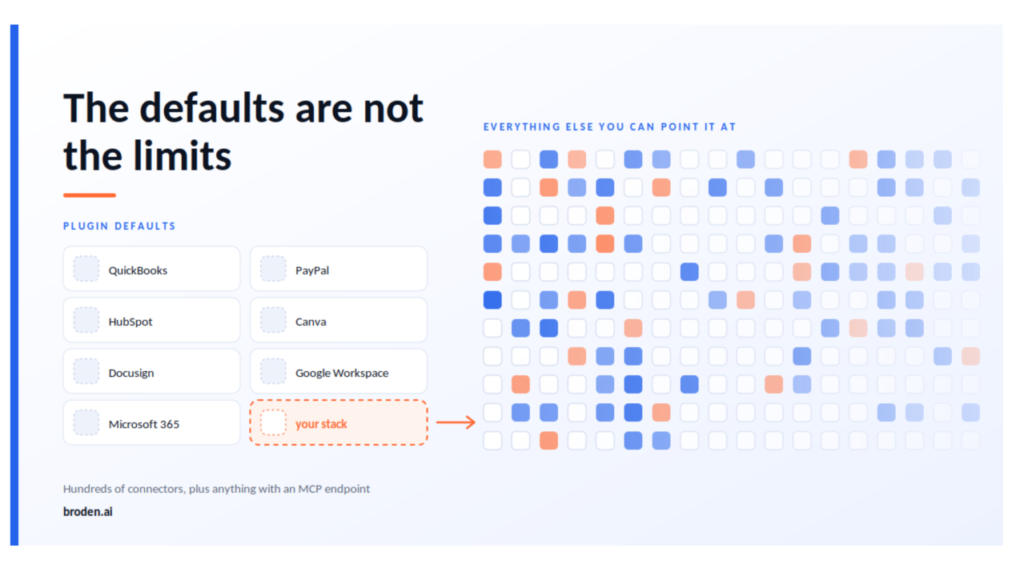
Most of the coverage of this launch, including the official announcement, names the same seven tools. Intuit QuickBooks, PayPal, HubSpot, Canva, Docusign, Google Workspace and Microsoft 365. Read enough of it and you come away believing that is the list, and that if your business does not run on those you are out of scope.
That is not how it works, and the distinction matters a great deal on this side of the Atlantic.
Those seven are the plugin’s defaults. They are the tools the skills point at out of the box, chosen because they reflect the most common US small business stack. When you customise the plugin, you can point a skill at the tools you actually use instead. A different accounting package, a different payment processor, a different CRM. The skill keeps its logic and reads from your systems. The month-end close does not care whether the ledger is QuickBooks or Xero. It cares that it can read a ledger.
Underneath the plugin sits the wider connector directory, which is a different and much larger thing. Independent counts through the middle of 2026 put it in the hundreds and it grows most weeks, spanning project management, communication, design, data warehousing, commerce and finance. Anything not in the directory can be added as a custom connection if it exposes an MCP endpoint, which increasingly most serious business tools do, and which is also how you would wire in an existing automation layer if you already run one.
So the practical position is closer to this. There is a curated set of workflows built on assumptions about a typical stack, and a much wider integration layer underneath that you can repoint at your own. The first ten minutes of setup are worth spending on that repointing rather than on running a default workflow against tools you do not use.
Why the September release matters more than it sounds
Fable 5.1 launched with a one million token context window by default, 128k maximum output and always-on adaptive thinking, priced the same as the previous generation.
Context window size is the kind of specification that means nothing to a founder, so here is what it translates to. The model can now hold most of your marketing operation in working memory at once. Twelve months of campaign data, your brand guidelines, every landing page you have shipped, the last two quarters of sales calls. Then reason across all of it in a single pass rather than in disconnected fragments.
The practical consequence is that the most common objection I hear has expired. Founders tell me they tried this eighteen months ago and it produced generic output that did not sound like their business. That was a fair observation at the time and it is stale evidence now. Generic output was usually a symptom of the model working from a thin slice of context, not from an inability to write well. Give it the whole picture and the output changes character.
That is not a claim that it is now perfect. It is a claim that a test you ran in early 2025 tells you nothing useful about a decision you are making in late 2026.
The failure mode nobody is describing
Here is where I want to be more careful than most of the coverage has been.
Picture the campaign workflow running against a typical SME setup. It reads twelve months of HubSpot data. It identifies a revenue dip in July. It analyses which campaigns performed during the surrounding period, forms a view about what worked, drafts a promotional strategy targeting the segment that looks most responsive, and generates a set of on-brand assets in Canva.
Every step of that is executed competently. And the output can still be worthless.
The July dip might be seasonal, and the correct response might be to do nothing. The campaign performance data might be unreliable because the attribution broke in March when someone changed the tracking, so the campaigns it identifies as winners are simply the ones that were measured correctly. The segment that looks most responsive might be the one you are least able to serve profitably, which is precisely why you were trying to move away from it. The promotional strategy might address a demand problem when what you actually have is a conversion problem sitting on a landing page that confuses people.
None of those failures are visible from inside the data. They are context that lives in the founder’s head, or in nobody’s head at all.
This is the thing to understand about automation at this level of capability. It does not create judgement. It multiplies whatever judgement is already encoded in your setup. Where that judgement is sound, you get a great deal more of it, faster and cheaper. Where it is absent or wrong, you now produce wrong work at higher volume with more polish, which is considerably harder to spot than doing nothing at all.
A business with clear positioning and clean data will get compounding returns from this. A business without those things will get a faster route to the same result it was already getting, and will conclude that AI does not work for companies like theirs.
What has to be true first
There are four things worth having in place before you connect anything, and none of them are technical.
The first is data you can trust. Claude will read your HubSpot at face value. If lifecycle stages are applied inconsistently, if source attribution has been broken for months, if half your contacts have no owner, then every analysis built on top of it inherits those faults and presents them confidently. A week of cleaning before you connect is the highest return work available to you.
The second is a decision about who you serve. Most SME marketing underperforms because it is spread across three or four segments that are being served adequately rather than one that is being served properly. No workflow will make that choice for you, and automating the spread just makes it more expensive.
The third is working measurement. If you cannot currently answer what worked last quarter with a straight face, adding a tool that optimises against your existing measurement will optimise against noise.
The fourth is a clear line about what stays human. Delegate the assembly. Do not delegate the decision about the offer and the audience. That distinction is the difference between leverage and abdication, and it needs to be explicit rather than assumed.
A sensible sequence
Start read-only. Use the business overview and the margin analyser before you touch anything that sends. Let it surface things for a fortnight while you watch where its judgement is good and where it needs supervision. The cost of being wrong in that mode is zero, and you learn more in two weeks of observation than in any amount of reading about it.
When you do pick a first live workflow, choose it on three filters. How often the task recurs, how much friction it creates, and what the financial impact is if it improves. High on all three is where you start. Everything else waits until the first one has proven itself, because a failed first attempt sets the whole thing back a year internally.
On governance, the controls are reasonable. Every task is initiated by you and you approve the plan before it runs. Your existing permissions carry over, so if someone cannot see a figure in QuickBooks today they cannot see it through Claude either. Anthropic does not train on your data by default on Team and Enterprise plans. In their own survey of small business owners, half named data security as their single biggest hesitation, which suggests the design brief accounted for it. That does not remove your obligation to have a view, but it does move the conversation from whether the technology is safe to whether your process around it is.
Two practical notes if you are UK based. The free AI Fluency for Small Business course built with PayPal is available on demand and is a reasonable two hours, but the in-person workshop tour is running in US cities only.
The more useful one is the stack. The defaults assume an American small business, so if you run Xero rather than QuickBooks, or Pipedrive or Zoho rather than HubSpot, do the customisation step before you run anything. Ten minutes of repointing is the difference between a workflow that reads your actual numbers and one that returns nothing and convinces you the whole thing was overhyped.
The part that does not automate
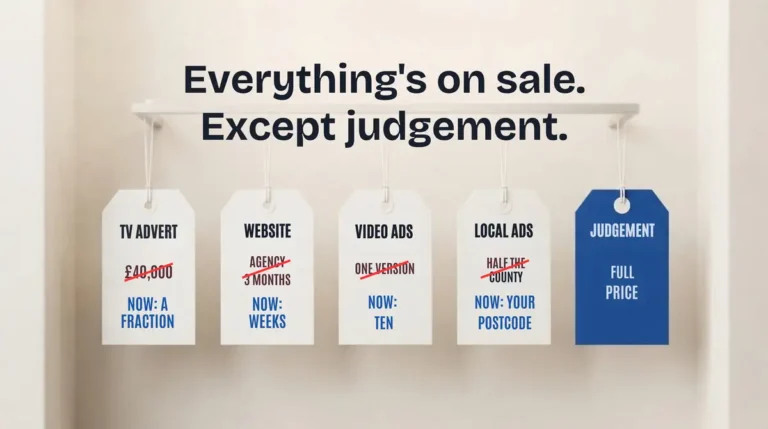
For the last three years, tooling was a credible explanation for slow marketing in a small business. Too expensive, too complicated, not built for us. That explanation has now expired, and its expiry is the actual news here rather than any individual feature.
What is left underneath is what was always the real constraint. Whether you know precisely who you are selling to. Whether the offer is right. Whether you can prove what worked.
Those questions have never been answerable by software and they are not answerable by this. AI scales the answer you already have, and it does not care whether that answer is a good one.
The businesses that see real returns over the next twelve months will not be the ones that adopted fastest. They will be the ones that fixed the structure first and then adopted, and from the outside those two groups will look identical for about six months before the results separate completely.
broden.ai works with SME founders on marketing strategy, execution and the automation layer underneath. If you are working out where to start, book a 30 minute call.
Frequently asked questions
It is a plugin from Anthropic that connects Claude to the systems a small business already uses, such as accounting, payments, CRM and design tools. It includes ready-to-run workflows across finance, operations, sales, marketing, HR and customer service, and you approve every action before anything sends, posts or pays. It adds nothing to the cost of a paid Claude plan.
No. QuickBooks, PayPal, HubSpot, Canva, Docusign, Google Workspace and Microsoft 365 are the defaults, chosen to match a typical US stack. You can customise the plugin to point its skills at the tools you actually use, such as Xero, Pipedrive or Zoho, and connect other tools through the wider connector directory.
Because a chat interface makes you supply the context every time: exporting data, explaining your business and repeating what you tried before. That overhead makes the tool impractical for busy founders. Connecting AI directly to business systems cuts that context cost to near zero, so it becomes usable inside the working day.
Four things. Data you can trust, especially in the CRM. A clear decision about who you serve. Measurement that tells you what worked last quarter. And a clear line on what stays human: delegate the assembly, not the decision about the offer and the audience.
Start read-only for a couple of weeks and watch where the AI’s judgement is good and where it needs supervision. Then choose a first live workflow on three filters: how often the task recurs, how much friction it creates and the financial impact if it improves. Customise the tools to your own stack before running anything.